(Van Xuan Technology Service Company Limited)
Công cụ hỗ trợ từ xa (Remote support tool)

|
Công ty TNHH Dịch vụ Công nghệ Vạn Xuân (Van Xuan Technology Service Company Limited) Công cụ hỗ trợ từ xa (Remote support tool) |
|
|
Đây là công cụ hỗ trợ từ xa, rất nhỏ nhẹ, tương tự như TeamViewer hoặc UltraViewer, và chỉ chạy trên máy tính Windows của người cần nhận hỗ trợ từ xa. (This is a remote support tool, which is quite lightweight, similar to TeamViewer and UltraViewer, and only run on the Windows computer of the user needing remote support.)
1. Bước chuẩn bị: Hãy download công cụ hỗ trợ từ xa theo link dưới đây (366 KB), rồi chạy công cụ này. | |
| 2. Hãy bấm đúp chuột vào dòng chữ mà mũi tên màu đỏ chỉ vào, để kết nối máy tính của bạn với server hỗ trợ từ xa của chúng tôi. (Double click the line, pointed by the red arrow, to connect your computer with our remote support server) | 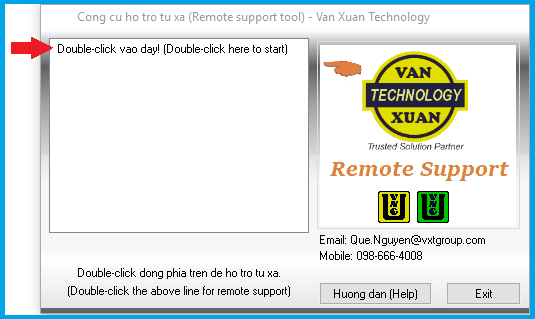
|
| 3. Máy tính của bạn sẽ thực hiện việc kết nối tới server hỗ trợ từ xa. (Your computer will connect to the remote support server) |
|
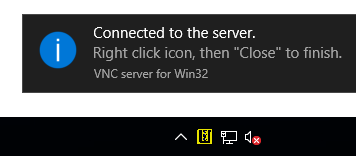
| 4. Nếu kết nối được, sẽ xuất hiện thông báo (If connected, a message will be displayed) |
|
|
5. Hãy thông báo với nhân viên hỗ trợ từ xa (ví dụ qua điện thoại) là bạn đã kết nối được với server, để bắt đầu việc hỗ trợ từ xa. (Please inform the remote support person (via phone for example) that you have connected to the server, to start the remote support session.)
|
| 6. Sau khi hỗ trợ từ xa xong, để ngắt kết nối, hãy bấm chuột phải vào biểu tượng công cụ hỗ trợ từ xa ở góc dưới bên phải của màn hình, rồi bấm Close (After the remote support session is finished, to disconnect from the remote support server, right click the support tool icon in the bottom right corner of the screen, then click Close) | 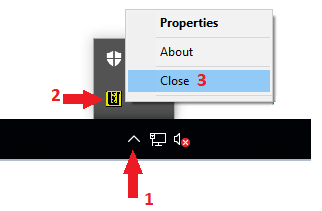
|